Small Business
Mercury Books Review 2026: Why I Prefer It for Tuffice LLC
I tried Xero, Zoho Books and other accounting tools for Tuffice LLC. Here is why Mercury Books feels simpler when accounting lives beside the bank.
Disclosure: This page includes a Mercury referral link. We may receive a referral benefit if you qualify and open an account. This does not affect our editorial independence. Learn more.
Pricing comparison
Mercury Books vs Xero vs Zoho Books
Prices checked September 19, 2026. I use regular plan pricing rather than short-lived introductory promotions so the comparison is easier to understand.

Mercury Books
Banking + books in one platform
$35 / month
Free through December 31, 2026
Accounting is built directly into Mercury. A Mercury account is required.

Xero
Current regular US price
$55 / month
Growing plan · $59/month from October 1, 2026
Standalone accounting software with connected bank feeds and auto-reconciliation.
Zoho Books
Standard is the closest bank-feed comparison
$20 / month
$15/month when billed annually
Standard plan includes connected bank feeds. A $0 Free plan is also available.
Xero note: Xero has announced US price increases from October 1, 2026: Early $27, Growing $59, and Established $97 per month.
Zoho note: Zoho Books has a free plan, but Standard is the fairest comparison here because connected bank feeds are included from that tier.
Prices can change and taxes or add-ons may apply. Always confirm the provider’s current pricing before subscribing.
My short version: I have tried Xero, Zoho Books, and other accounting tools while running Tuffice LLC. They are capable products, but Mercury Books feels more seamless for the way our small business works because the accounting sits directly beside the banking activity instead of depending on a separate bank-feed layer.
That does not mean Mercury Books is automatically better accounting software for every company. Xero and Zoho Books are mature standalone accounting platforms with broader ecosystems and workflows that may be better for more complex businesses. My point is narrower: for a founder-operated small business already using Mercury, the integrated model removes friction I had accepted as normal.
Mercury Books is currently free through December 31, 2026 and is priced at $35 per month starting January 1, 2027. The pricing comparison above shows how that compares with Xero and Zoho Books as of September 19, 2026.
Why I started looking for accounting software
Like many small-business owners, I did not start with a grand accounting stack. I started with a bank account, expenses, subscriptions, invoices, registration fees, and the need to keep everything organized enough to understand the business and prepare clean records later.
The obvious next step was separate accounting software. I tried Xero, Zoho Books, and other tools. They all approached the problem in the familiar way: the accounting platform connects to the bank, imports transactions, categorizes them, and then asks you to reconcile the accounting records with what happened at the bank.
That model works. But for Tuffice LLC, I kept feeling that I was maintaining a second representation of activity that already existed somewhere else.
What changed when Mercury Books appeared inside the bank
The first thing that felt different was not a special report or an AI feature. It was simply the location of the accounting system.
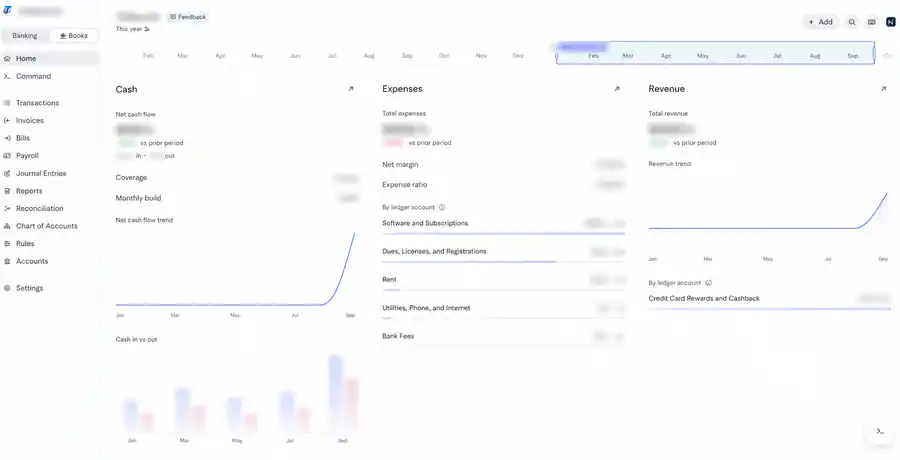
Inside my Mercury account, I can move between Banking and Books without leaving the workspace. The Books navigation includes Transactions, Invoices, Bills, Payroll, Journal Entries, Reports, Reconciliation, Chart of Accounts, Rules, and Accounts.
That makes the accounting feel less like another application connected to the bank and more like an accounting layer built on top of the financial activity that is already happening.
Mercury is a fintech company, not a bank
This distinction matters, especially in a finance article. Mercury is a fintech company, not an FDIC-insured bank. Its business banking services are provided through partner banks, including Choice Financial Group and Column N.A., Members FDIC.
Mercury Books is an accounting product inside the Mercury platform. The banking relationship and the accounting software are therefore closely connected in the user experience, but they are not the same legal product.
That is one reason I describe the advantage as integration rather than saying Mercury itself is a bank that happens to include accounting.
The dashboard gives me the information I actually want first
When I open Books for Tuffice LLC, I see cash activity, expenses, revenue, trends, and the ledger categories underneath those numbers. It is a founder-friendly starting point because I can quickly see where money is moving before I drill into individual accounting records.
The screenshot above is from my real Tuffice LLC Books workspace. I blurred the financial figures and identifying details because the purpose of the image is to show the workflow, not publish the company’s private financial data.
For me, this is more useful than opening a blank accounting dashboard and then waiting for another system to import and interpret the bank activity.
The biggest practical difference is reconciliation
With a separate accounting platform, the accounting system usually receives a bank feed and then reconciles its accounting records against that imported activity. That is normal accounting software behavior, and both Xero and Zoho Books support connected bank feeds.
Mercury Books has a structural advantage for Mercury activity because the banking data originates inside the same platform. Mercury says its own accounts are automatically synchronized with Books and can be reconciled continuously.
For a small business like mine, that removes one layer of maintenance. I spend less time thinking about whether two systems agree and more time thinking about whether the transaction was categorized correctly.
Automatic categorization is useful, but I still review it
A large part of everyday bookkeeping is repetitive classification. Software subscriptions, registration fees, hosting, phone service, bank fees, and other recurring costs tend to follow patterns.
Mercury Books uses rules, past transaction behavior, and automation to help categorize activity. That is exactly the kind of task where I want software to reduce repetitive work.
I still review the treatment because automation can be wrong and because the accounting meaning of a transaction is sometimes different from what the merchant name suggests. The goal for me is not zero human review. It is less unnecessary manual work.
AI-assisted journal entries are more useful than I expected
Manual journal entries are where accounting software can start to feel technical. You need to choose the correct accounts, decide the debit and credit treatment, add a useful memo, and make sure the entry balances.
In Mercury Books, Command can help with bookkeeping questions and can assist with tasks such as writing journal entries. In my experience, that makes a manual journal voucher feel much less intimidating because I can describe what I am trying to record and get a structured response in the same environment.
I do not treat AI as the accountant. I still review the accounts, amount, explanation, and accounting treatment before anything is posted. That is especially important for owner contributions, distributions, loans, taxes, depreciation, and year-end adjustments.
The value is not that AI removes judgment. The value is that it removes some of the friction between knowing what happened in the business and turning that event into a properly structured accounting entry.
Reports are closer to the underlying money
Mercury Books provides core financial statements including Profit and Loss, Balance Sheet, Cash Flow, and General Ledger reporting. Those are the reports I expect from a real accounting system rather than a lightweight expense tracker.
Xero and Zoho Books also provide strong financial reporting, so this is not a feature Mercury uniquely owns. What feels different to me is the context: I can move from the bank activity to the accounting treatment and then to the report without mentally switching between separate financial systems.
For Tuffice LLC, that is enough to make the reporting feel more current and connected to the actual operating activity.
Mercury Books pricing: free through 2026, then $35 per month
Mercury currently lists Books as free for all of 2026. My own Tuffice LLC billing screen shows the free period ending on January 1, 2027 and the next monthly charge at $35.
After the free period, $35 per month is not the cheapest accounting option available. Zoho Books has a free plan and lower-priced paid tiers, while Xero has several plans at different price points.
For me, the question is therefore not whether Mercury wins on the lowest sticker price. The question is whether avoiding another accounting platform, another bank-feed relationship, and some reconciliation overhead is worth the subscription cost.
How the price compares with Xero
For a small-business comparison, I think Xero Growing is more useful than comparing Mercury only with Xero Early because Growing removes the Early plan’s limits on invoices and bills and includes auto-reconciliation and broader performance tools.
As of September 19, 2026, Xero lists Growing at $55 per month in the United States. Xero has also announced that the US price will increase to $59 per month from October 1, 2026. Early is currently $25 and is scheduled to become $27, while Established is currently $90 and is scheduled to become $97.
Xero is a mature standalone accounting platform with a large ecosystem. A business that needs deeper accountant workflows, established integrations, multi-currency features, project tracking, or more sophisticated accounting operations may reasonably prefer that maturity even if the monthly price is higher.
How the price compares with Zoho Books
Zoho Books has a different pricing shape. It currently offers a $0 Free plan for very small businesses, while the Standard plan is $20 per month or $15 per month when billed annually.
I use Standard in the side-by-side comparison because Zoho lists connected bank feeds as part of Standard, which makes it a more meaningful comparison with the integrated bank-transaction workflow I am discussing here.
Zoho Books is a capable accounting platform and can be a very good value, especially for businesses already using the wider Zoho ecosystem. For me, the trade-off is that it is still a separate accounting system connected to the bank rather than the accounting system being part of the banking environment itself.
Why I am not calling Mercury Books the universal winner
A product can fit my business well without being the right answer for everyone. That distinction matters in a review where there is also a referral relationship.
Xero and Zoho Books have years of product maturity behind them. Businesses with complex inventory, multiple entities, established accountant workflows, specialized integrations, detailed project accounting, or other advanced requirements may find a dedicated accounting platform more suitable.
Mercury Books is also tied to the Mercury platform. You need a Mercury account to use it, which is a meaningful limitation for a business that banks elsewhere or cannot meet Mercury’s eligibility requirements.
My conclusion is therefore about workflow fit for Tuffice LLC, not an overall score that every company should copy.
Where Mercury Books fits best in my view
I think Mercury Books is most compelling for founder-operated U.S. companies that already use Mercury as their main operating account and do not need a highly specialized accounting stack.
Service businesses, small software companies, agencies, consulting firms, and other relatively straightforward operations may benefit the most from reducing the number of systems that have to be connected and maintained.
Mercury Books can also connect external banks and cards, and Mercury currently lists integrations including Stripe, PayPal, and Gusto. That helps if not every part of the financial life of the business sits inside Mercury.
For founders living outside the United States, account eligibility is a separate question. Our Mercury vs Wise Business comparison explains the address, country, and verification issues that matter before you can use the banking side of the platform.
What I would still ask an accountant to review
Integrated software does not eliminate professional judgment. I would still involve a qualified accountant or tax professional for entity tax treatment, year-end adjustments, depreciation, owner compensation, loans between related parties, unusual journal entries, and federal or state filing questions.
For a foreign-owned U.S. LLC, information-reporting rules can be especially important. A clean accounting system helps produce reliable records, but it does not decide whether a filing such as Form 5472 is required.
If that applies to your structure, read our Form 5472 and pro forma Form 1120 guide alongside the current IRS instructions.
My conclusion after using Mercury Books for Tuffice LLC
For the way Tuffice LLC operates today, I prefer Mercury Books to maintaining a separate accounting platform. The reason is not that Xero or Zoho Books are weak products. They are established accounting systems with capabilities that Mercury may not match for every business.
The advantage for me is simpler: the books are sitting next to the banking activity. Transactions, categorization, reconciliation, journal entries, invoices, bills, and reports feel like parts of one financial workflow instead of several connected tools.
At $35 per month after the free 2026 period, I will still judge Mercury Books by whether that convenience continues to save enough time and complexity to justify the subscription. For Tuffice LLC right now, I think it does.
Sometimes improving a small-business finance stack is not about adding another application. It is about removing a boundary that no longer needs to be there.
Sources and further reading
- Mercury — Mercury Books
- Mercury Help Center — Getting started with Mercury Books
- Mercury Help Center — Creating and managing journal entries
- Mercury Help Center — Understanding reports in Mercury Books
- Xero US — Pricing plans
- Xero US — October 2026 pricing update
- Zoho Books US — Pricing
- Zoho Books — Bank feeds
Compare Mercury and Wise Business for non-US founders by eligibility, operating address, USD access, international payments, verification, and fit.
A 2026 step-by-step guide for non-US residents forming a US company, getting an EIN, opening business accounts, and handling key compliance.
Understand when a foreign-owned US disregarded LLC may need Form 5472 and a pro forma Form 1120, what transactions can matter, and the penalties.